
Copyright 2011 Matt Farrington
I took the old hard drive to work today and externally plugged it into another iMac, and it mounted fine. I could read from, and write to it. I was still convinced that it was the problem so bought a new one on the way home. I went with a 40GB SSD, which will hold the OS and the applications, and I’ll get a Firewire SATA dock (hopefully I can find one with Firewire 400) and put the original 250GB drive in it for file storage. I’ll be sure to back it up in case it gives me any trouble in the future.
Copyright 2011 Matt Farrington
After I got the drive in, I put the LCD back in and turned it on to see if it worked. It did! Then I turned it back off, because I only had the 512MB RAM chip installed, which I learned isn’t enough for OS 10.6.

Copyright 2011 Matt Farrington
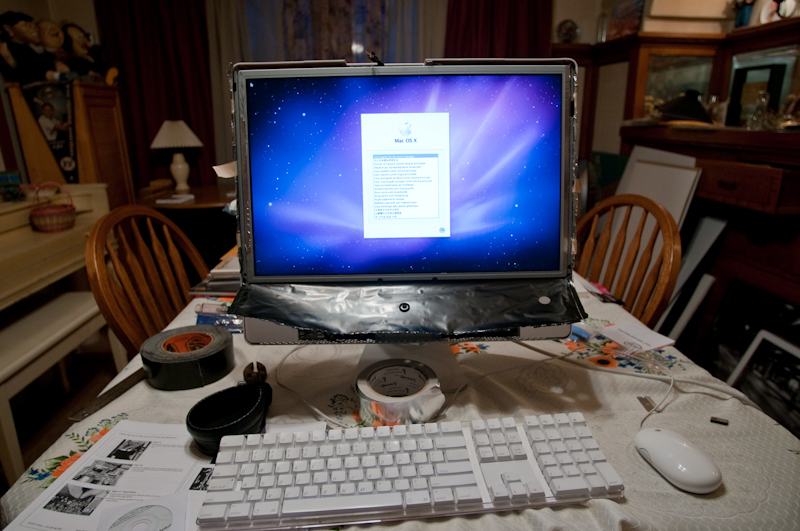
Here it is with the EMI shielding re-adhered and the vertical edges of the LCD frame taped up with foil tape, as it was originally. I actually had a roll of foil tape on hand, for taping the seems of heat ducts, which I’ve done exactly once.

Copyright 2011 Matt Farrington
Here it is up and running. With the OS installed, I moved on to installing CS4 (pictured above). From the moment I press the power button to the moment the finder is up and running, takes 23 seconds. I’ve never timed it with the old hard drive, so I don’t know for sure it’s faster, but it seems quicker. I’m use to turning it on and walking away in the morning. The programs open faster than they use to, but I’m not sure if that should be attributed to the SSD, or just that fact there’s a brand new uncluttered hard drive in there ,regardless of what kind it is. I’m glad it’s working anyway, so that’s all for now.
Leave a Reply