
Copyright 2011 Matt Farrington
Yesterday I brought home the computer I’ve used at work for more than four years. I won’t go as far as saying it worked well, but it usually worked. I did stop at the Apple Store on the way home and laid down my thirty dollars for OS X 10.6.3, because 10.4.11 wasn’t cutting it anymore, and I needed it to install Google Chrome. The installation went without a hitch. Everything was up and running, I got it setup on my network, the file sharing was working; but when I sat down to setup my printer, the Finder was half froze. The mouse moved (no beach ball), the Dock would pup up, I could click on folder and it would be highlighted. Unfortunately, the menus, folders or applications in the Dock wouldn’t open, nor could I switch to an already open program. I left it sit that way for an hour, but it never changed, so to shut it down by holding the power button. It won’t startup anymore. I get the gray screen with the Apple logo, and it stays in that state indefinitely.
I tried resetting the PRAM and booting off the OS disc, but it still wouldn’t move beyond the gray screen. My initial thoughts were problems with the RAM or the hard drive. I knew this computer had two RAM chips running asymmetrically (512MB and 1GB), so I tried it with only one or the other, and it still didn’t work. Then I moved on to the hard drive. I used the instructions on ifixit to find my way.

Copyright 2011 Matt Farrington

Copyright 2011 Matt Farrington
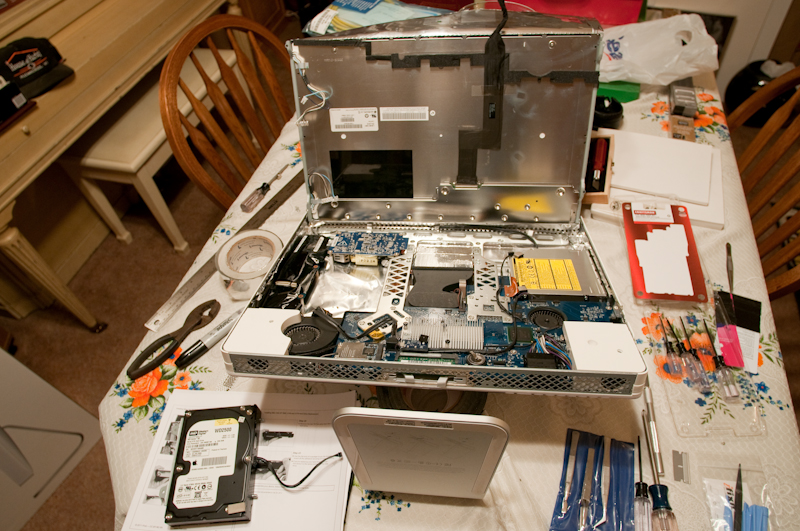
Copyright 2011 Matt Farrington
As you can see, I managed to get it out. I’ll take it to work tomorrow and see if it will mount on another Mac using a SATA-to-USB cable. Either way, I’ll replace it with a new one. My thinking is, that even if it mounts to another computer, there could be a bad sector or damaged files that are affecting the boot process alone. We’ll see what happens.
I was expecting to find turkey and stuffing under the tin in picture three. Would it boot off the disk? That is an intel, right?
Intel, yes; boot off the disc, no. No matter what I tried, I couldn’t get past the gray screen. Were you able to boot from OS CD when you’re computer died?